Difficulty
Easy
Steps
6
Time Required
00:15:00

In Progress
This guide is currently being written. Reload periodically to see the latest changes.

User-Contributed Guide
This guide is not managed by the site's staff.

Private
This guide will not appear in search results and can only be viewed by team members!
Quiz
0
-
-
1) The transmitter sends a signal
-
2) The signal bounces off of an object
-
3) The reflected signal is absorbed by the receiver
-
4)The written code makes a calculation for the distance between the sensor and object using the speed of sound and time passed
-
-
-
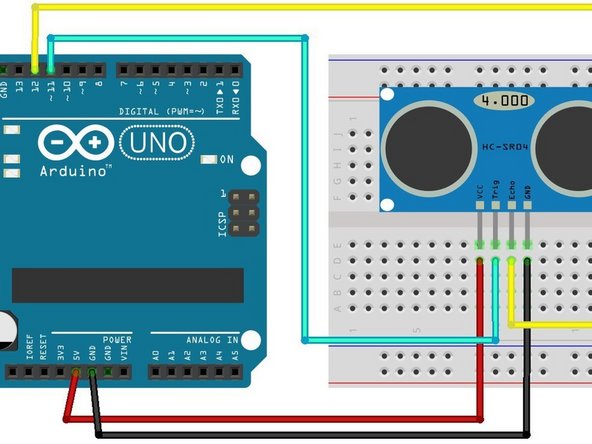
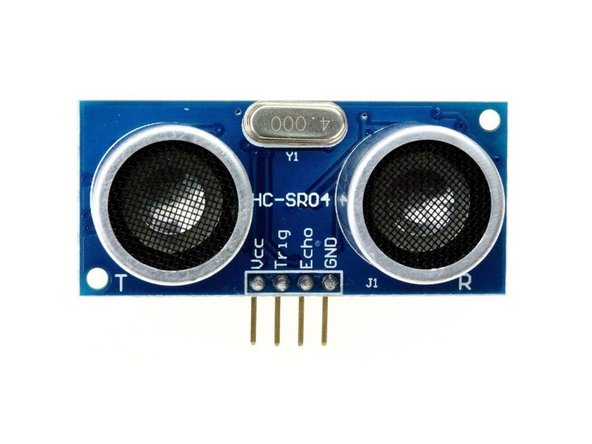
Jumper wires connect the ultrasonic sensor, HC-SR04, to the arduino
-
On HC-SR04, the VCC (red) connects to 5V on the Arduino via jumper wire
-
On HC-SR04, the Trig/input (teal) connects to pinmode 11 on the Arduino via jumper wire
-
On HC-SR04, the Echo/output (yellow) connects to pinmode 12 on the Arduino via jumper wire
-
On HC-SR04, the GND (black) connects to the GND on the Arduino via jumper wire
-
-
-
At the tippity top of the code before the set-up or Serial.begin(9600) is where variables are defined. They need to be defined so when they are in a function, the computer will know what the variables means. The variables necessary for this sensor are...
-
const int trigPin=11
-
const int echoPin=12
-
long duration
-
int distance
-
int distance 1
-
float oldvalue=0
-
float newvalue=0
-
-
-
This first function is used for finding the distance between the sensor and nearest object through the defined variables, trigPin and echoPin. This is before the set-up. The start of the function, float getdistance (int trigPin, echoPin), states the function name and the variables
-
{digitalWrite (trigPin, LOW) //prepares to emit the sound that reflects off of the nearest object
-
delayMicroseconds(2) //the delay is there so there can be silence before the sound is emitted
-
digitalWrite (trigPin, HIGH) //amps the trigPin so it releases the sound
-
delayMicroseconds(10) //there needs to be silence after emitting the sound so the receiver (echoPin) is not confused by the two
-
digitalWrite (trigPin, LOW) // the trigPin needs to return to low so it does not keep emitting a sound
-
duration= pulseIn (echoPin, HIGH) //the echoPin/receiver needs to be amped so that it can hear the sound after it bounces off of the nearest object
-
distance=duration * 0.034/2 //this equation at the end calculates the distance by using the duration (the time it took for the sound to bounce off of the object and come back) and the speed of sound
-
-
-
Ranges help to eliminate junk data that sometimes shows up on the screen. Overall, it makes the data look precise and organized. This is also before the set-up.
-
if (distance> x) {distance=x;} //states that if the distance calculated is greater than a certain number, then the ranges causes the distance to equal that certain number (establishes "x" as the maximum number)
-
if (distance<y) {distance=y;} //states that if the distance calculated is less than a certain number, then the range causes the distance to equal that certain number (establishes "y" as the minimum number)
-
return (distance); //returns the desired distance
-
-
-
This section establishes the roles of the trigPin and echoPin
-
pinMode (trigPin, OUTPUT);
-
pinMode (echoPin, INPUT);
-
Serial.begin(9600); //begins the loops following the set-up
-